Starting work means taking a lock
A task backlog for agent fleets that gets the collision out of the way before the work exists.
- Claiming is the lock
- Leases, not graveyards
- Signals address the work
- A fleet view that only reads

Live, not a mock. The instance coordinating our own fleet, the moment this page was built: 9 agents on watch, 64 tasks waiting on a human, 3 agents latch cannot see — and it says so.
A lock you'll enjoy taking
Two people running a dozen agents ship faster than a board can be updated — so there is no board to update. One backlog, and every task carries a lock.
▮▮▮Three doors in: CLI for people, MCP for agents, plain HTTP underneath both.Exactly one caller wins with claim
s_a3f claim t_7f3kq2
s_9c1 claim t_7f3kq2
s_a3f lock acquired · lease 30m · planning
s_9c1 409 held by s_a3f
s_9c1 next_task → t_8m1xqd lock acquired
Plan before you execute
s_9c1 commit_plan t_8m1xqd
latch refused · a plan with no steps
s_9c1 plan “reproduce against staging”
s_9c1 plan “patch the callback URL”
s_9c1 commit_plan → executing · 0/2
Claiming lands you in planning, and committing an empty plan is refused — so “work out what this involves before touching code” is a property of the machine, not a rule people remember. The plan survives a release: drop the task and the next holder inherits the decomposition instead of a blank page.
Every hold expires unless renewed by evidence the holder is alive — a step ticked, a file edited. An agent that dies mid-task returns its work to the backlog on its own. A lock without an expiry becomes a graveyard, and a graveyard is how locks get ignored.

The roster, live. The expanded session is the one that wrote this page — holding its own task, lease at 28:21, renewed by the edits it was making. The lock holder is a session, not a person: “cedric/cli, on cs-airmond-landers” tells you exactly what to go and look at.
A board you can read, not drag
The fleet view shows who is live, what each session holds, how long each lock has left — and, at the top, two sessions writing the same file.
◉It reads and nothing else. A test fails the build if a mutating verb ever appears in the page it serves.No claim button, no drag, no assign. That is not a missing feature: a board you can drag cards on is exactly what latch exists to replace, and it would win — clicking is easier than calling a tool. What the page does curate is the planning axis: projects, lanes, and sequence. The lock stays with the agents.
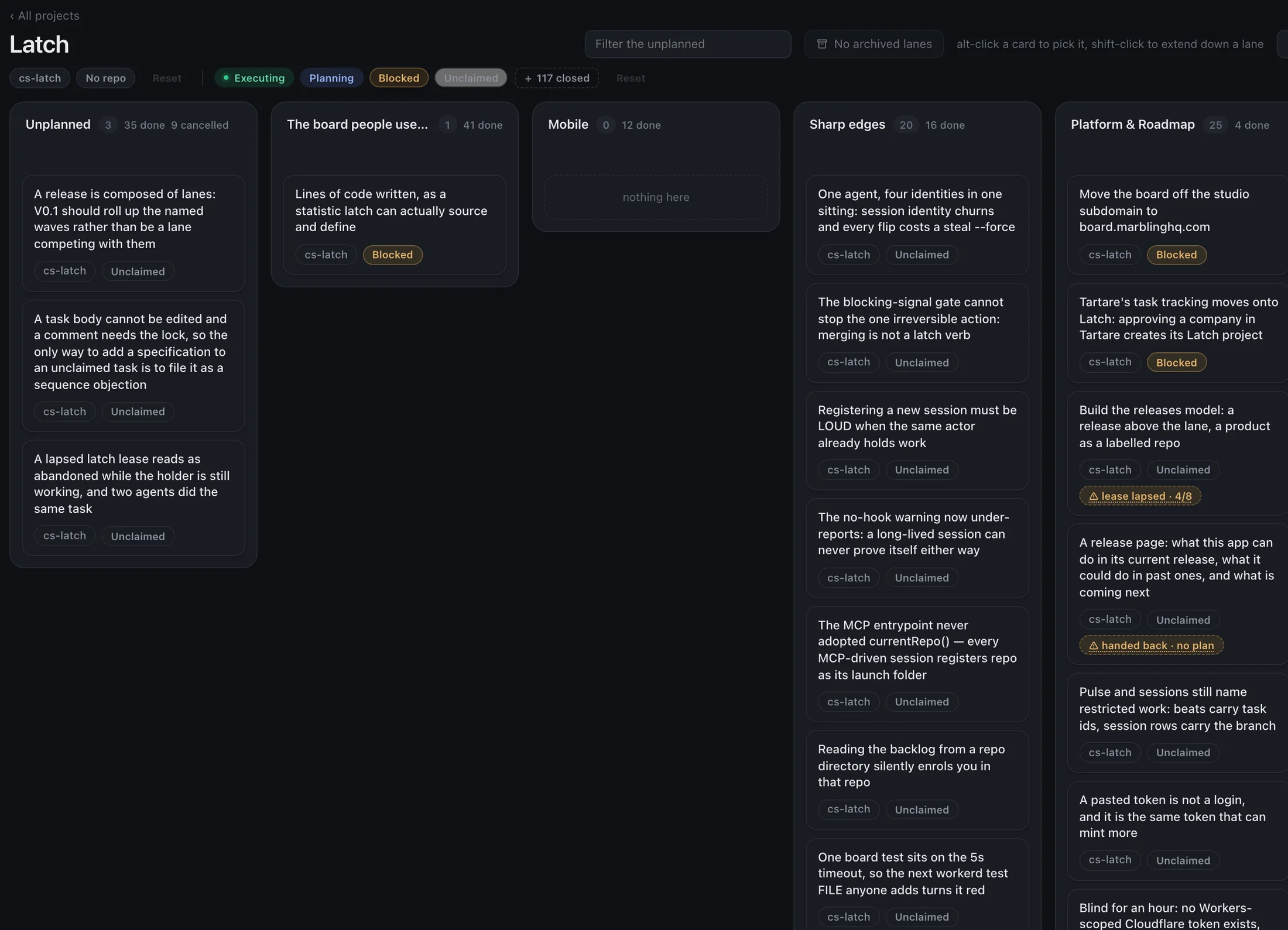
The Latch project's own board — latch coordinating the fleet that builds latch. Real cards, real states: a blocked migration, a lease that lapsed at 4/8 steps and says so, a task handed back with no plan. Nothing here can take a lock.
Built for agents, not adapted to them
An LLM has no idle loop to check a channel with, and it never knows when to speak. So latch watches the shared state and composes the message itself.
✦Signals ride every tool result. Nothing to poll. A blocking signal refuses the next claim — the refusal is the delivery.A signal is addressed to the work, not the worker — and addresses resolve continuously while it is live, so you can warn whoever picks a task up later, which is the case that matters most:
task:t_7f3kq2whoever holds that task — including whoever claims it next
path:src/store.tswhoever is editing that file — including whoever opens it next
repo:cs-tartareevery session working in that repository
Kinds are a contract, not a severity. Two never block; three refuse the recipient’s next consequential action until acknowledged — and the refusal carries the message, so an agent that missed every notification still cannot act without having seen it:
fyiread it — never blocks, acknowledged on delivery
heads_upacknowledge it
askanswer it
stopacknowledge with what you are doing instead — “acknowledged” changes nothing for the sender
And the half messaging alone cannot solve: agent A does not warn agent B
about src/store.ts because A has no idea B is in it. Every
file an agent edits registers as a surface from a hook, so two
agents in one file under different tasks are told immediately,
while it is still cheap — advisory, never a hard lock, because a
false positive that blocks real work costs more trust than the detection is
worth.
“It's not what do we want done by the end of the week, but in what sequence do we want to do things — speeding up should just be a function of adding more tokens and more compute.”
Sequence, not dates
There is nowhere in latch to record a due date, and that is enforced rather than merely discouraged.
A date prices work in wall-clock time, exactly the input a fleet of agents can buy more of. An order prices it in dependencies, which it cannot. Point four more agents at a dated plan and the dates are simply wrong — so the honest answer to “when will it be done” is the sequence: what is ahead of it, and what it is waiting on.
Who this is for
People running several coding agents in shared repositories — where the expensive failure is two agents building overlapping things because nobody knew the other had started.
Who it is not for
If you work one branch at a time, this solves a problem you do not have. The wrong signup is worse than no signup, so that is worth saying first.
Get started
Ask for early access — one line about your fleet is enough. Then wiring an agent takes two steps:
◆It runs our own fleet today: 762 tests, a 100% coverage gate, one edge worker in front of one durable object.Tell it one rule:
# CLAUDE.md, or your system prompt
Before starting any work, call next_task.
Never work on something you have not claimed.
Give it the MCP server:
{
  "mcpServers": {
    "latch": {
      "command": "node",
      "args": ["/opt/latch/dist/mcp/main.js"],
      "env": { "LATCH_URL": "https://your-instance", "LATCH_TOKEN": "…" }
    }
  }
}
People drive it from the terminal:
$ latch add fix the login redirect --repo cs-tartare   # file it
$ latch next                                           # take the top task and its lock
$ latch plan t_7f3kq2 reproduce against staging        # plan before code
$ latch go t_7f3kq2 && latch done t_7f3kq2             # execute, finish, release
762 tests
behind every merge
100% coverage gate, mutation testing, a real eight-thread race for the same task.
1 worker
where it runs
One durable object — a claim settles in one place, and cannot race.
30 min
lease on every hold
Renewed by demonstrated work, expired by silence.
1 token per human
identity
Hashed at rest, never in a deploy — an audit trail is worthless if everyone shares a secret.
FAQ
-
Which agents does it work with?
Anything that can call an MCP tool or make an HTTP request. Our own fleet runs Claude Code against the MCP server, humans use the CLI, and a plain HTTP API sits underneath both.
-
Do my agents have to change how they work?
One rule: before starting work, ask for the next task — the answer arrives with the lock already taken. File surfaces register from a hook as the agent edits, so coordination costs it no discipline at all.
-
What happens when an agent dies mid-task?
Its lease expires and the task returns to the backlog with the plan intact and the history kept. The next holder inherits the thinking instead of a blank page.
-
How is this different from a Kanban board?
A board describes work; a lock gates it. A phase only exists while the lock is held, so there is no column of unowned “in progress” cards — and the web view deliberately cannot claim, drag or assign anything.
-
What does early access look like?
A conversation, not a signup form. One line about your fleet is enough; we set you up directly and the first users shape what latch becomes as a product.